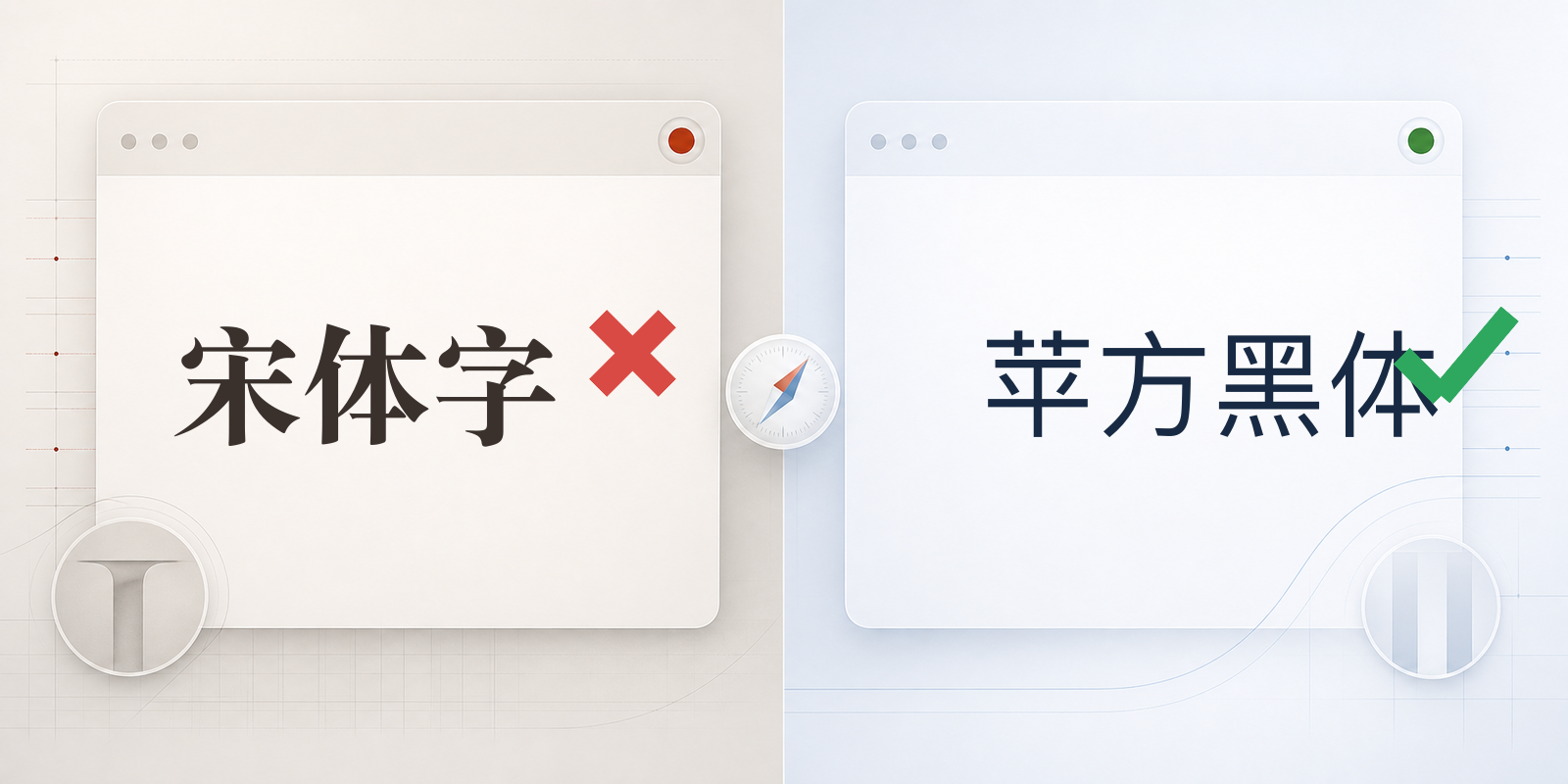
This post explains a common Safari typography problem for developers and designers: a page is intended to use a clean sans-serif style, but some Chinese text unexpectedly appears in a serif font.
To readers who use Chinese every day, the change is immediately visible. It is roughly comparable to a navigation label suddenly switching from a modern sans-serif face to Times New Roman. The text remains readable, but it no longer belongs to the surrounding interface.
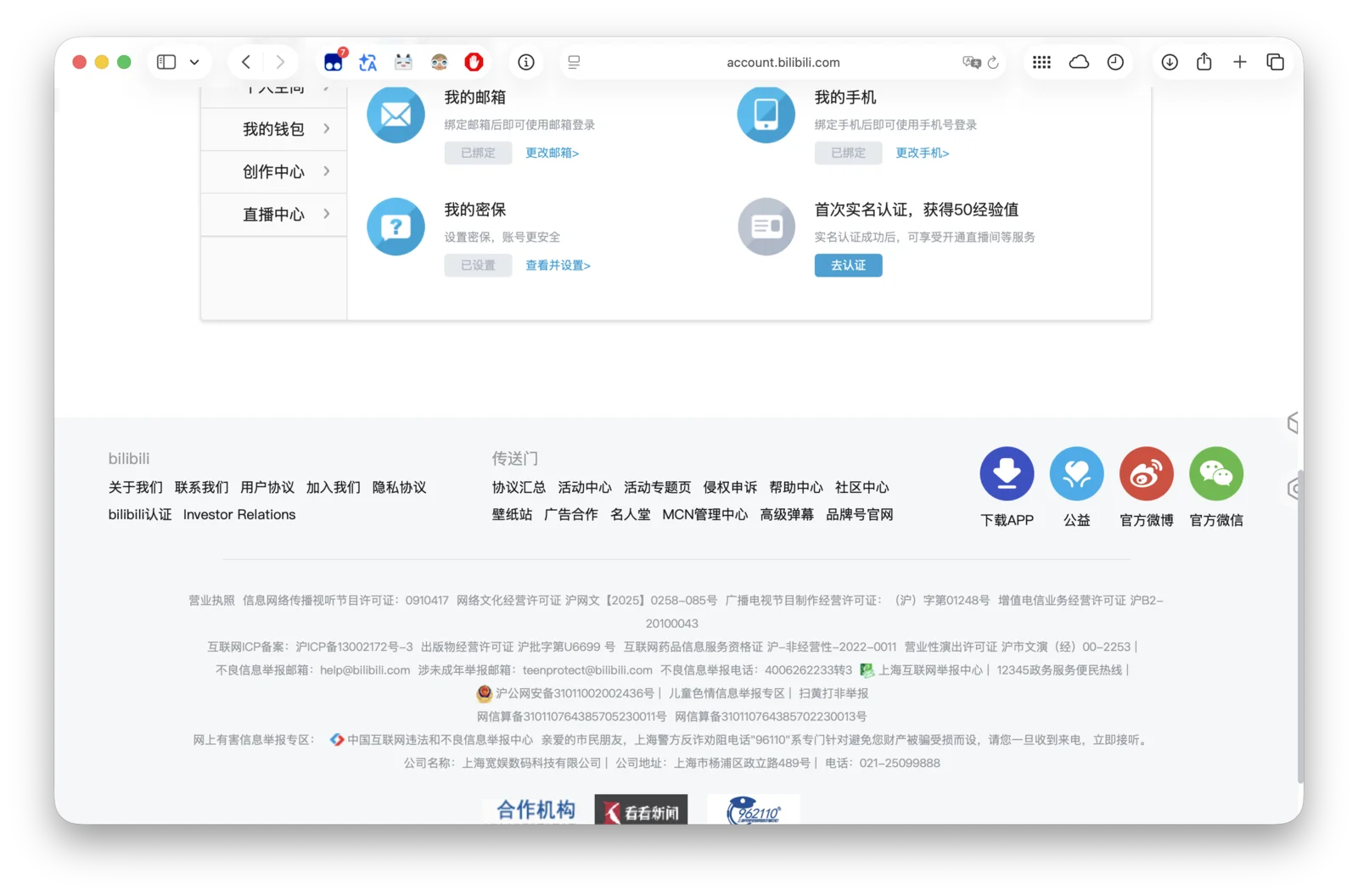
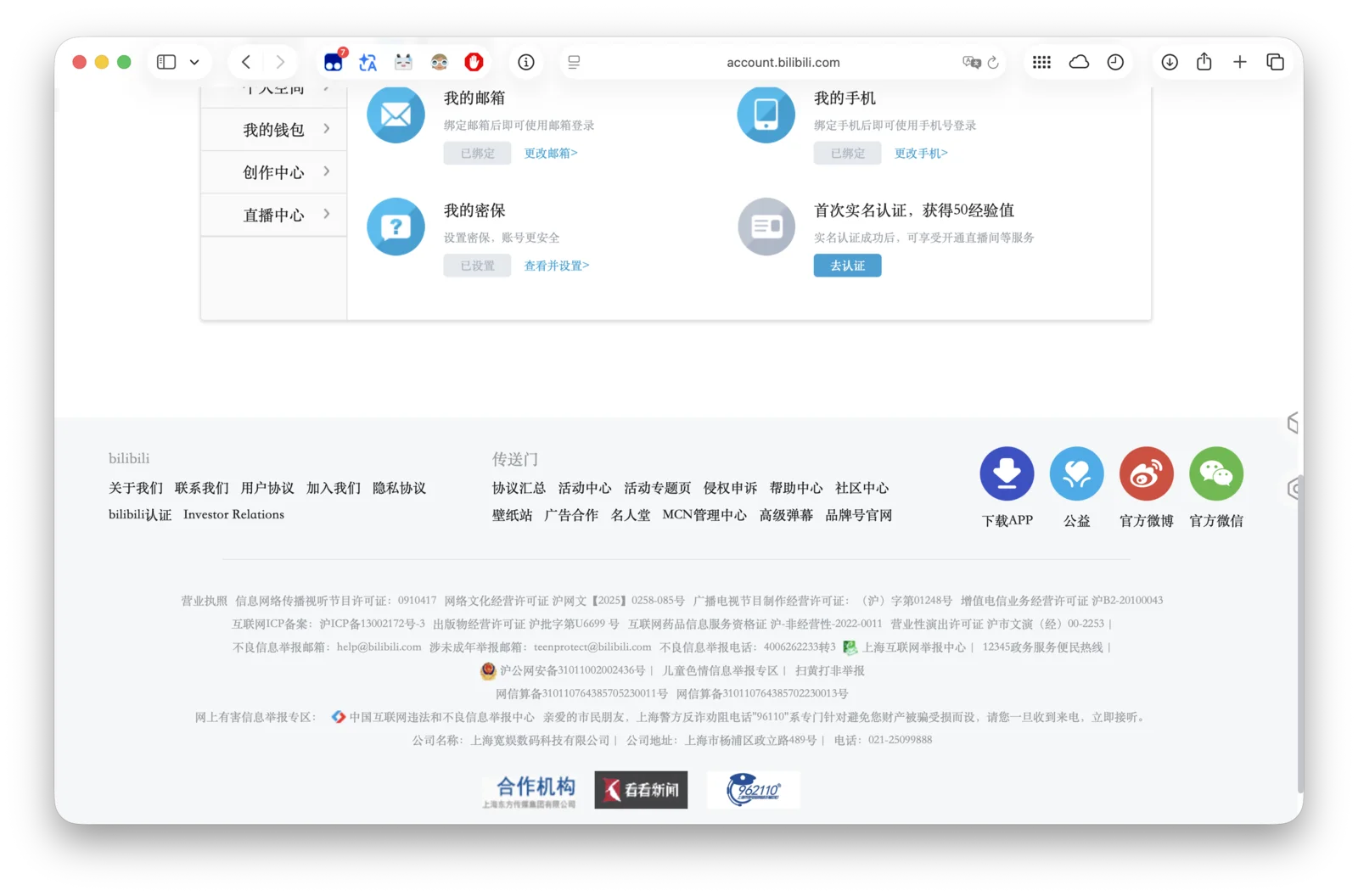
If You Read Chinese and Just Want to Fix Safari
You do not need to understand the CSS or change any website code. The project provides one ready-to-use stylesheet:
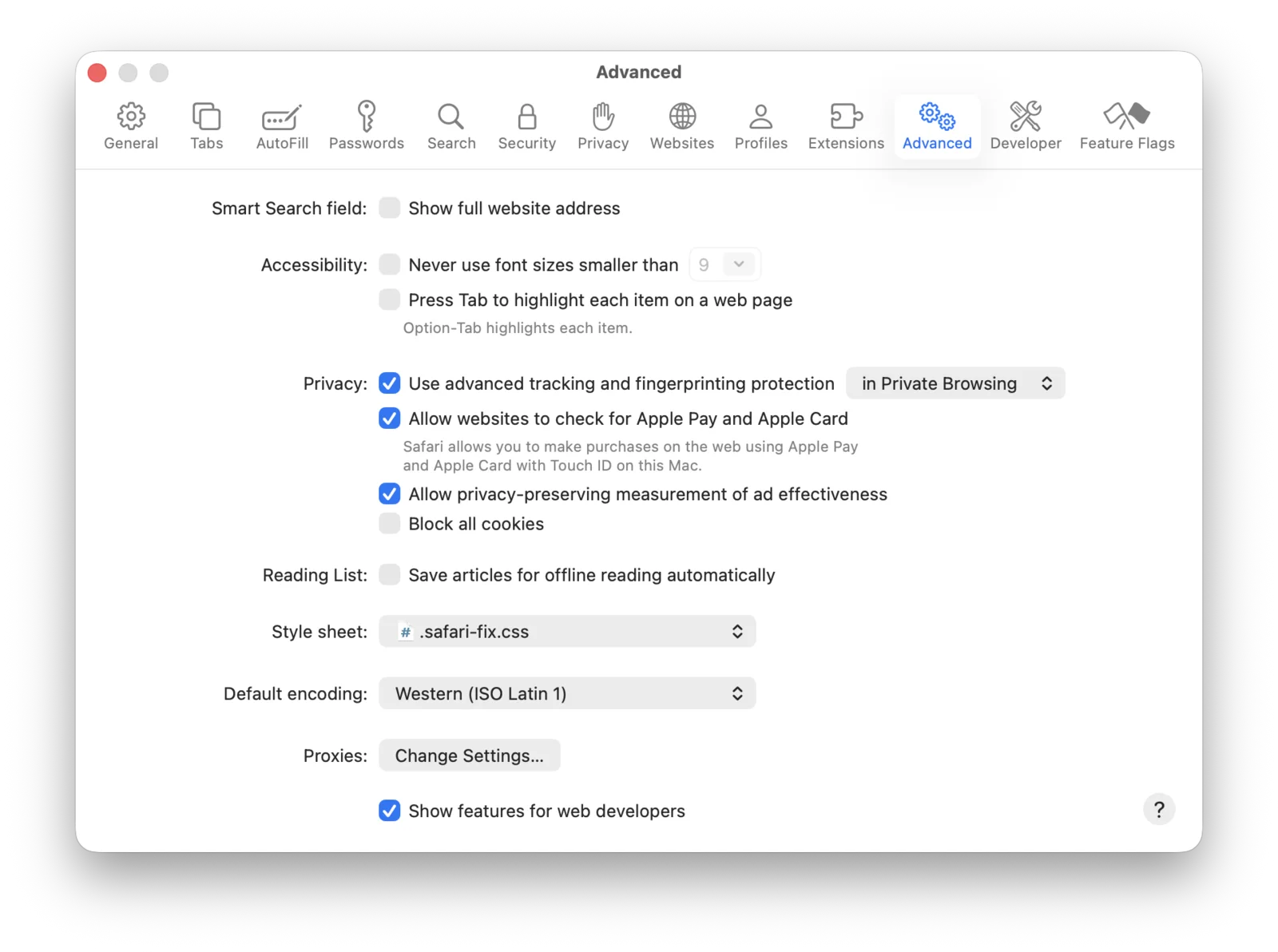
- Download the complete
safari-fix.css. - Open Safari Settings and select Advanced.
- Choose the downloaded file from the Style sheet menu.
- Quit Safari completely with Command+Q, then reopen it.
If you later want to disable the fix, return to the same menu and select None Selected. It does not install a font, modify macOS, or require a Safari extension.
The rest of this article explains the underlying problem and how developers can prevent it on their own websites.
The Short Explanation
Many sites begin their font stack with Arial, Helvetica, Inter, Roboto, or another Latin typeface. These fonts can render English letters and numbers, but they may not contain Chinese characters.
When the browser reaches a character that the selected font cannot draw, it must find another font. This is font fallback. If the remaining stack does not name a suitable Chinese sans-serif font, Safari may choose a Chinese serif font instead.
That is why a line can contain perfectly normal English alongside Chinese text that looks as though it came from a different design system. Chrome and Safari may also choose different fallback fonts for the same CSS, so testing only one browser can hide the problem.
Start with a Better Font Stack
If the design is meant to be sans-serif, say so for both Latin and Chinese text. A practical stack for a multilingual interface might look like this:
|
|
The exact order depends on the product and supported platforms, but the intention should be clear:
- keep the preferred Latin or brand typeface first;
- include an appropriate Chinese sans-serif family;
- include a suitable Windows alternative when Windows is supported;
- end with the generic
sans-seriffamily.
Avoid placing SimSun, Songti SC, or another Chinese serif face inside a stack that is otherwise intended to be sans-serif. Those fonts can be excellent choices for editorial reading, literature, or a deliberately serif design. They are simply the wrong fallback for a sans-serif interface.
If the design intentionally uses a Chinese serif font, declare that choice explicitly rather than relying on whichever fallback the browser happens to find.
Do Not Solve It by Overriding Every Font
A frequently shared workaround applies PingFang to every element:
|
|
This removes the visible serif fallback, but it also removes much of the site’s typography.
It can replace icon fonts, change monospace code, alter Latin headings, override component-specific styles, and erase intentional serif typography. In other words, it fixes one fallback decision by taking all font decisions away from the page.
A safer solution should change only the missing Chinese glyphs while leaving Latin text, numbers, icons, code, and deliberate serif choices alone.
A Targeted Fallback Rule
The core technique used by this project is an @font-face rule with unicode-range. The following shortened example tells Safari to use PingFang only for the listed Chinese character ranges when a page requests Arial:
|
|
Latin characters still come from Arial. Chinese characters that Arial cannot provide come from PingFang. The page therefore keeps its existing Latin metrics and visual identity while gaining a predictable Chinese sans-serif fallback.
The complete project also covers bold text, Traditional Chinese, extended character ranges, common Latin font names, and Windows Chinese font names. The snippet above is only an explanation, not the full stylesheet.
You can review or download the maintained file here:
If the project fixes the problem for you, consider giving it a Star on GitHub. It helps other Safari users and web developers find the solution.
A User Fix and a Website Fix Are Different
When you do not control the affected websites, the downloadable Safari stylesheet is a practical compatibility layer. For a site you maintain, correcting the site’s own font stack is preferable because every visitor benefits without installing anything.
What Designers Should Check
CJK typography should be part of design review, not left entirely to the browser.
A useful review does not require every team member to read Chinese. Check the visible form of the text:
- Does Chinese body text use a serif or sans-serif style that matches the design?
- Do navigation labels and buttons look consistent with nearby Latin text?
- Do regular and bold Chinese text have a clear but stable weight difference?
- Are punctuation, brackets, and full-width symbols visually consistent?
- Does the design still work when a single line mixes Chinese, English, and numbers?
Chinese characters are visually dense, so differences in weight and spacing can be more obvious than expected. A Latin-only mock-up is not enough to validate a multilingual interface.
What Developers Should Test
Use actual Chinese content in browser testing. A few translated menu labels are more useful than placeholder boxes or repeated sample characters.
At minimum, test:
- Safari and Chrome on macOS;
- normal and bold text;
- headings, navigation, buttons, form controls, and code blocks;
- Simplified and Traditional Chinese when both are supported;
- mixed Chinese, English, numbers, and punctuation;
- the production build after web fonts finish loading.
In browser developer tools, inspect the font that actually renders the Chinese glyphs, not only the computed font-family declaration. The computed stack may say Arial or Inter even though a different local font supplied the Chinese characters.
Also test web-font failure. A blocked, slow, or partially loaded font should fall back to a typeface from the same broad category rather than unexpectedly switching from sans-serif to serif.
Privacy and Limitations
The project is CSS only. It contains no JavaScript, analytics, telemetry, or access to browsing history.
As a Safari user stylesheet, it cannot reliably change text drawn into images or canvas elements, and some embedded or isolated components may not inherit its rules. No generic stylesheet can perfectly infer whether every serif choice was intentional, which is another reason the website’s own font stack remains the best place to solve the problem.
The Broader Lesson
sans-serif is a design category, not a guarantee that every writing system will receive the expected local font. A multilingual font stack should describe the intended result for the scripts the product actually supports.
For Chinese interfaces, the essential principle is simple: pair a Latin sans-serif design with an explicit Chinese sans-serif fallback, preserve deliberate serif typography, and test the rendered fonts in the browsers your users rely on.