Ġabra Maltese Dictionary now has an MDX edition for compatible readers on phones and computers. Mac users can continue using the native dictionary with macOS lookup features.
The earlier article introduced the Mac edition. The project has since moved from gabra-maltese-macos-dictionary to gabra-maltese-dictionary, adding ready-made MDX files and cross-platform conversion tools. You can download the dictionary for a phone without first converting it on a Mac.
Choose the format before downloading
The v1.0 release now contains both an MDX ZIP and the native macOS DMG. Their lookup coverage differs.
| Edition | Contents and lookup | How to use it |
|---|---|---|
| MDX + CSS | 19,831 searchable headwords containing 21,083 source records | Import into an MDX-compatible reader |
macOS .dictionary |
21,083 entries with approximately 4.5 million searchable word forms | Install in Dictionary and use supported system lookup features |
The MDX headword count is lower because one headword can contain several records. The project’s validation report records all 21,083 source entries as retained. A lower headword count does not by itself mean entries were dropped.
The approximately 4.5 million searchable forms belong to the native macOS edition. MDX provides headword lookup without the same inflected-form index. Keep the native edition on Mac if you often look up conjugations or plurals while reading. MDX makes the entries portable, with a different search scope.
Continue using the native Mac dictionary
Download GabraMalteseDict_v1.0.dmg from Releases, open it, and copy Gabra.dictionary into ~/Library/Dictionaries. In Finder, press Shift-Command-G and enter that path if the folder is difficult to locate.
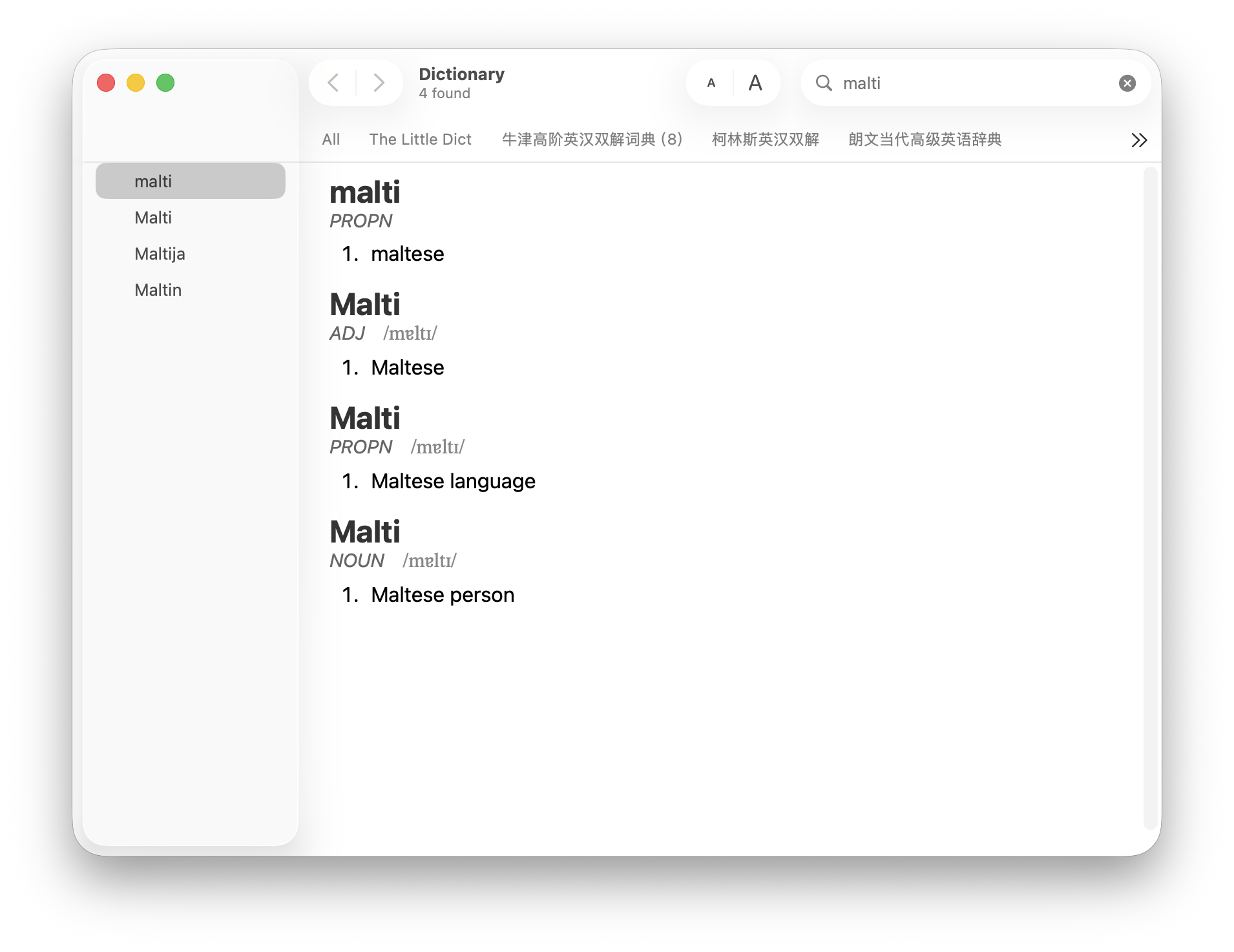
Open Dictionary, enable Ġabra Maltese Dictionary in Dictionary → Settings, and try a Maltese word. The native view displays definitions and any part-of-speech, phonetic, and root information present in the entry (see Figure 1).
In supported apps, use the Look Up contextual-menu command, three-finger tap, or Force Click. Choose the gesture in System Settings → Trackpad → Point & Click → Look up & data detectors. Spotlight dictionary results depend on your macOS configuration. Confirm lookup in Dictionary first, then check the other entry points.
You can keep an existing native installation. Adding the MDX edition does not require removing the Mac dictionary.
Import MDX on a phone or another computer
Download GabraMalteseDict_MDX_v1.0.zip. Extract these two files and keep them together:
|
|
Gabra.mdx contains the dictionary; Gabra.css controls entry styling. A reader may use its own default appearance when the stylesheet is missing, so transfer both files when copying or syncing the dictionary.
You also need an MDX-compatible reader. The ZIP supplies dictionary files, without installing a reader. The project README lists these choices:
| Platform | Readers listed by the project |
|---|---|
| iPhone / iPad | OpenMDict or MDict |
| Android | DictTango or MDict |
| Windows | GoldenDict-ng or DictTango Windows |
| Linux | GoldenDict-ng |
| MDX on macOS | GoldenDict-ng or MDict; Apple Dictionary uses the native edition above |
Use the reader’s dictionary-import or add-folder feature. On a phone or tablet, transfer both files into storage the reader can access. Import screens vary, so follow the selected app’s instructions.
Try a headword after importing and check its definition and appearance. Entries retain available parts of speech, phonetics, and roots. The stylesheet follows the reader’s light or dark theme; edit Gabra.css to customize it. Check a few entries because rendering can differ between readers.
If a word does not appear after importing
First check whether Ġabra appears in the reader’s dictionary list and is enabled. If it is missing, return to the import step and select the extracted Gabra.mdx, rather than the downloaded ZIP. For a desktop reader that scans folders, confirm that the configured folder contains the dictionary file.
If the dictionary is listed but a search returns nothing, open a known headword within the dictionary and try searching for it. This helps distinguish a loading problem from an unmatched query. A form copied from a sentence may be a conjugation or a plural. Try its dictionary form next. The native Mac edition has broader word-form lookup; changing MDX readers does not supply that missing index.
If definitions appear but the layout looks wrong, check that Gabra.css was transferred alongside the MDX. Keep the filenames unchanged. If the files ended up in different folders, put them together again and refresh or reimport them as your reader requires. Open several entries in dark mode too, checking that the text remains readable against the background.
Before relying on the dictionary somewhere without internet access, disconnect and look up a word. This checks that the files are actually available on the device, rather than waiting to download from cloud storage when you need them.
Rebuilding uses two separate tools
Download the ready-made files if you only want to use the dictionary. To customize the stylesheet or rebuild MDX, run these commands from the new repository’s root:
|
|
This requires Python 3.10 or newer and works on macOS, Windows, and Linux. On Windows, activate with .venv\Scripts\activate. Output goes into dictionaries/mdx/ as Gabra.mdx and Gabra.css. Edit assets/mdx/Gabra.css before building to change the generated stylesheet.
The included Body.data snapshot contains entry bodies extracted from an existing native dictionary. Rebuilding MDX from it does not fetch newer upstream data or regenerate the native word-form index. A newer build date alone does not indicate newer dictionary content.
The native edition has a separate BSON build, requiring macOS and Apple’s Dictionary Development Kit. Put one upstream .tar.gz containing gabra/lexemes.bson and gabra/wordforms.bson in data/, then run:
|
|
The result is macos/objects/Gabra.dictionary. Use bash scripts/update_macos.sh --install to install it too; an existing installed dictionary is backed up under build/ first. This script expects you to supply the upstream archive. It does not download the latest BSON automatically.
Data and licensing
Dictionary data comes from Ġabra / MLRS at the University of Malta under CC BY 3.0. Project code is licensed under GNU GPL v3. Check the data and code licenses separately when redistributing files or building another dictionary; the attribution page records the source.
Use the native edition for system integration and inflected-form lookup on Mac. Use MDX for headword lookup on other devices, keeping its stylesheet with the dictionary. Current downloads and build requirements are in the new repository README.