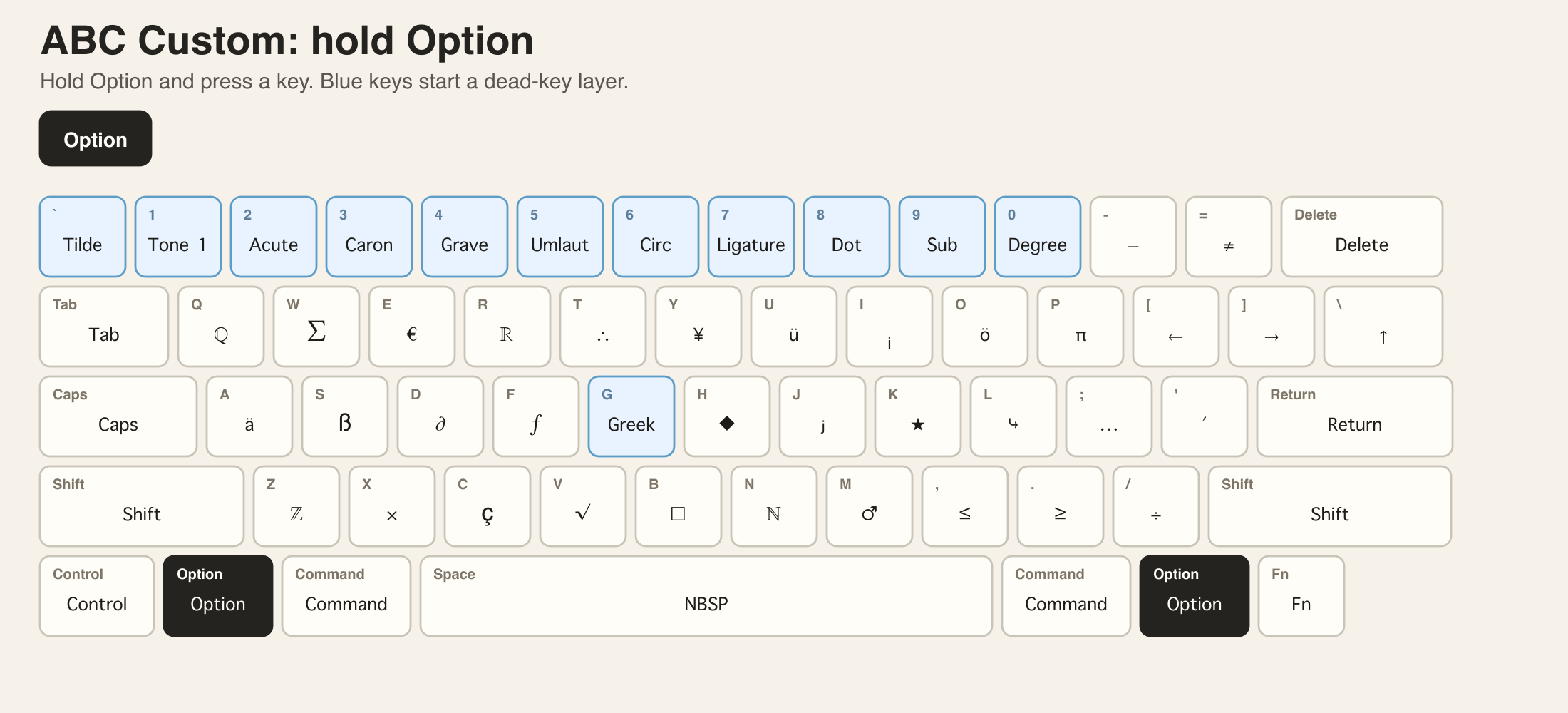
This post introduces ABC Custom Keyboard, a macOS keyboard layout that keeps normal US typing unchanged while making accents, pinyin tones, Greek letters, Maltese characters, and symbols easier to type.
I have open-sourced ABC Custom Keyboard, a macOS keyboard layout for people who want to keep typing on a standard US ABC keyboard while gaining fast access to European Latin characters, Greek letters, pinyin tone marks, Maltese-friendly extensions, mathematical symbols, numbered markers, and technical symbols.
The project is here: Jingyuan-Zheng/ABC-Custom-Keyboard.
Why I Built It
The standard US keyboard is comfortable for daily English typing, programming, and shortcuts. The problem starts when multilingual writing enters the workflow.
Typing German, French, Italian, Spanish, Portuguese, Maltese, Greek, pinyin, or academic notation often means switching input sources, opening the character viewer, or memorizing unrelated shortcuts. Language-specific keyboard layouts can solve one problem but create another: the physical keys no longer match US keyboard muscle memory. A German layout, for example, moves Y.
ABC Custom keeps the base layer as standard US ABC, then adds mnemonic Option layers on top of it. The goal is simple: one US keyboard for multilingual writing and research.
Start from the Normal US ABC Layout
ABC Custom assumes a standard US ABC physical layout. The base layer stays familiar, so everyday English typing and most Command / Control shortcuts continue to behave as expected.
Direct Option Layers
Hold Option and press a key to type the symbol shown on that key. Blue keys are dead-key prefixes: press the prefix first, release it, then press the target key.
Shift + Option opens a second direct layer, including superscript and circled-character prefixes.
The direct layers cover common symbols such as ℕ, ℤ, ℚ, ℝ, π, Σ, √, ∂, ≠, ≤, ≥, arrows, dashes, currency signs, checkmarks, and boxed or starred markers.
Dead Keys That Are Easier to Remember
Dead keys make composition fast without assigning every accented character to a separate shortcut.
For example:
Option+1, thena, outputsāOption+2, thene, outputséOption+5, thenu, outputsüOption+G, thenp, outputsπ
The pinyin tone layers follow tone numbering: Option + 1 to 4 correspond to tones 1-4.
The umlaut layer uses Option + 5 because the % key visually suggests two dots. The dot-above layer uses Option + 8 because the * key suggests a dot or star.
Greek, Subscripts, Superscripts, and Technical Symbols
For academic writing, the layout also includes Greek letters on mnemonic Latin keys. Option + G enters the Greek layer, so p maps to π, m maps to μ, l maps to λ, w maps to ω, and d maps to δ.
There are also paired subscript and superscript layers, plus degree, diameter, empty-set, copyright, registered, trademark, circled characters, and round operators.
Installation
The easiest path is the DMG release:
- Download
ABC-Custom-Keyboard.dmgfrom the latest GitHub Release. - Open it and drag
ABC Custom.bundleto theKeyboard Layoutsfolder shown in the DMG window. - Log out and log back in, or restart macOS.
- Open System Settings and add
ABC Customfrom Keyboard Input Sources.
Manual installation is also available by copying bundle/ABC Custom.bundle to:
|
|
Then log out and back in, or restart macOS.
Files for People Who Want to Modify It
The editable layout file is layouts/ABC Custom.keylayout. The packaged release bundle is under bundle/ABC Custom.bundle, and the keyboard maps in the README are generated from assets/*.svg with tools/generate_keymap_svg.py.
If you write in multiple European languages, use pinyin tone marks, type Maltese characters, or frequently need Greek and math symbols, ABC Custom gives those characters a predictable home without giving up the standard US keyboard.
Related Posts
- For a native Maltese dictionary that works with macOS Look Up, see Ġabra Maltese Dictionary for macOS.
- For document translation workflows that pair well with multilingual typing, see Translate Document Quick Action.